

From last few days, I received multiple suspicious emails regarding my PayPal account. In this article, I will share some basic steps to identify and investigate these types of suspicious emails.
Please note that I have chosen PayPal for this article however you can use the same techniques for any other domain .
Below is the snapshot of a suspicious email that I received regarding my PayPal account and we will investigate this suspicious email.
In Information Technology terms such emails are called Phishing emails and purpose of these emails is to get the personal information of victim . Such information can be username or password of your financial account, your date of birth and any other Personally Identifiable Information (PII).
Let’s Start:
1: The subject of the suspicious email present that this is important information regarding my account and my full attention is required on this. This is a very effective trick that hackers used to hide bad intentions behind this alarming subject line. (as per below-attached) 2: In the subject line, the hacker uses the Special character in around Action and News statement. Legitimate companies never use any special character like this in subject line. Hackers OR Spammers use this to bypass email security controls.
3: In the first step, I search the subject line on Google and got a few hints that make this email suspicious. As this type of email is already reported by users from different companies. 4: Hacker use the email address (secure[@]int-limited[.]com) that try to made the Subject of the email look like from the information security department but when we check the real address behind the top, the email is different (as per below-attached). We call this Email Masking, and hackers use this trick frequently in phishing campaigns.
PayPal mostly use only account name PayPal with email say “PayPal <[email protected]>” 5: Now We will check the domain int-limited* in a Google search however we can see that many people reported this and there is no clue that this domain belongs to PayPal except intl.paypal.com.
 6: When I checked the domain ownership record of int-* domain on who.is, I found that this domain is not registered yet or no data available in Whois record.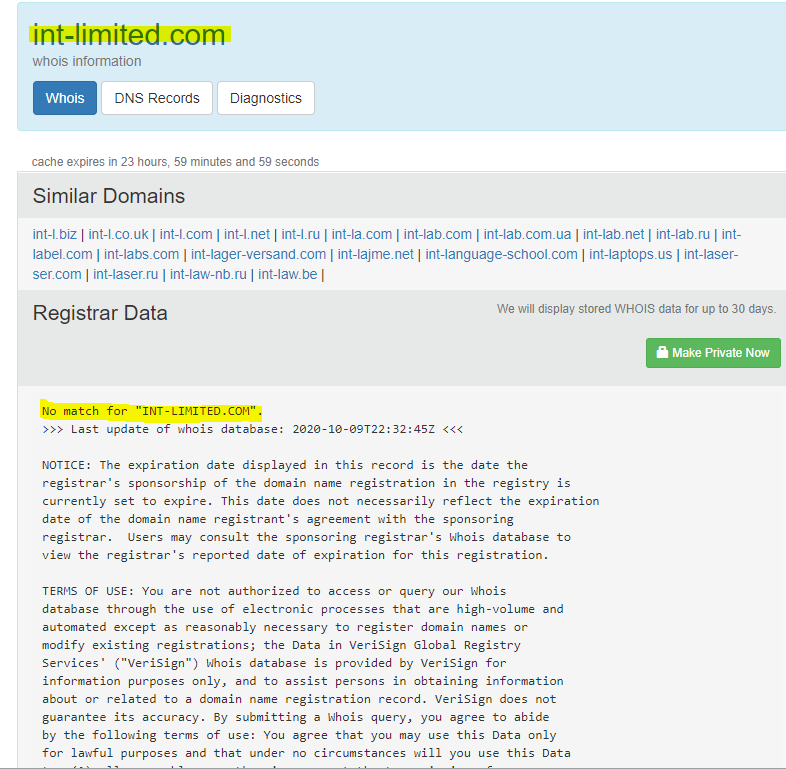
7: I’ve confirmed that it does not relate the masked domain to Paypal. Now I am going to check the reputation of the original domain where this email initiated (spainjanjuk dot com). I use bright cloud to check the reputation of the domain. This is a freely available service. There are many other free resources available to check the reputation of any domain.As per Bright cloud result, this domain score is 40 out of 100 due to risk score this domain is suspicious. Also, this domain is uncategorized.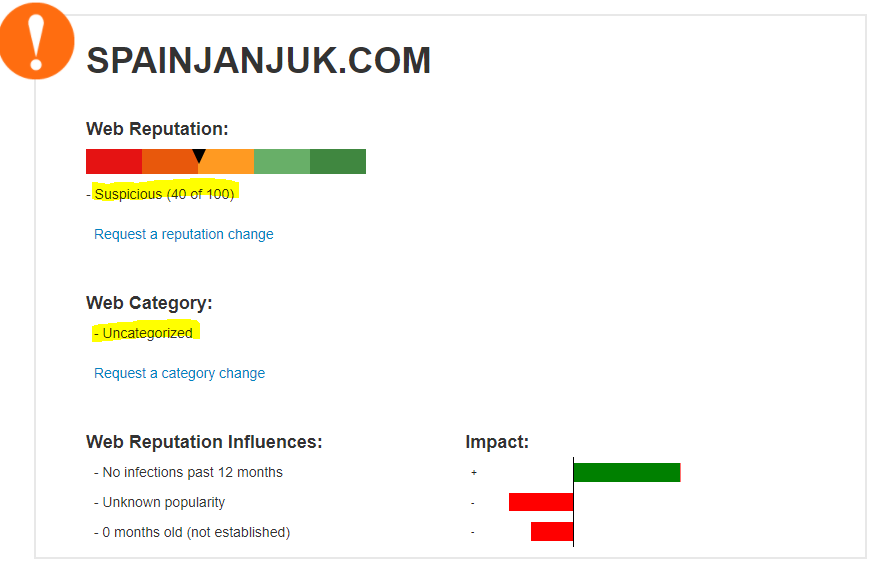 8: If you go back to original email ,you will find that the Scammer has placed the logo of PayPal on top left of the email body to make this email look legitimate and impersonate as PayPal. Please note down that this is just a Logo and no URL is embedded in this. One can get the logo file easily from Google Images.
Paypal always uses the embedded URL of Paypal behind the logo.
9: In the email body, a URL is embedded in Log in to PayPal button. When I hover mouse over it , the embedded URL shows that it is not belonging to the PayPal domain. I copied that domain and checked it for Dynamic Analysis . URLScan is a free website and can be used by anyone..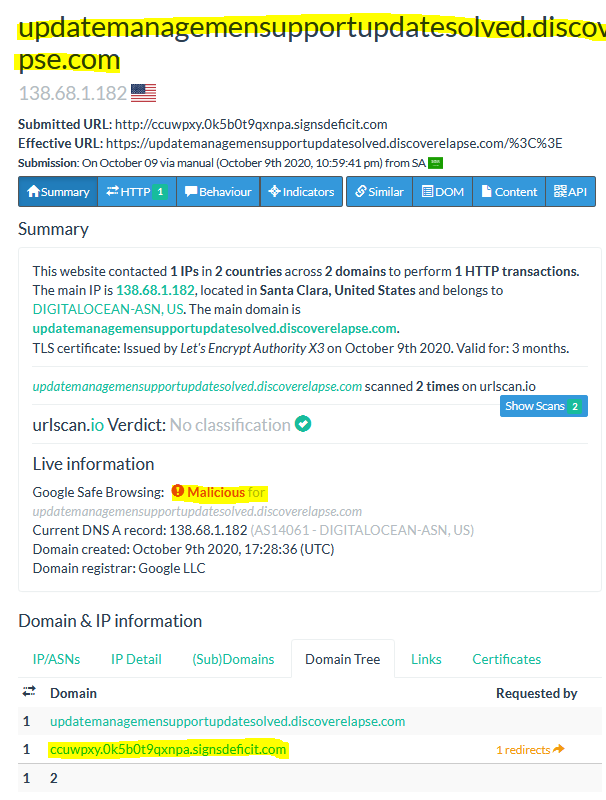 9–1: As you can see that domain does not belong to PayPal.
9–2: The embedded URL is Malicious as per Google Safe Browsing.
9–3: The embedded URL redirects to another URL, that is also not belonging to the PayPal domain.
Conclusion:
As per the analysis , it is now confirmed that this is a Phishing email, and I have investigated this without installing any tool and by using freely available resources . By the way , I have forwarded this email to PayPal security ([email protected]) and also reported this in the Microsoft junk system (a Junk button on top of the email body) .


Nice Article for phishing detection. Keep up the good work.