
Authors
This article has been co-authored by.
- Mr. Waqas Haider – Chief Information Security Officer – HBL MicroFinance Bank
- Mr. Muhammad Ali – Manager GRC – Telenor MicroFinance Bank (EasyPaisa)
Introduction
They say, in Cyber Security, people are the weakest link. No matter how educated and knowledgeable end-users are within your organization, after-all they are humans.
So what’s wrong with being a human? Ah, humans have emotions, humans are sensitive creatures. This, my friends, is also termed as the biggest weakness in the eyes of threat actors and precisely what makes humans vulnerable to potential social engineering Attacks.
Now, what exactly do threat actors need to do to exploit this vulnerability? The answer lies in simple methods. crafting campaigns that create a sense of urgency, pressure, and target the victims emotional feelings such as fear, wants, eagerness, temptation and sometimes even greed.
What could be a better method than sending some well crafted communication via available channels. Trick them into reading the content, clicking some link or giving away their personal or sensitive information. Yes this is all “Social Engineering”.
There are multiple categories of techniques used in Social Engineering out of which few are mentioned as below.
- Phishing – Spoofed emails tricking the end users into giving away their information.
- Whaling – Similar to phishing but is used to target only high profile users.
- Baiting – Exploiting the greed of users by tricking them to give away confidential information in exchange for something free.
- Smishing or SMS Phishing – Spoofed SMS messages.
Let’s now discuss some history. It is said, it all started, back in the 90’s. Those from the 90’s can easily recall “AOL” (America Online) an American web portal and online service provider, then and now owned by Yahoo. Yes, AOL was the very first target where a group of hackers named Warez Community impersonated as AOL employees and collected login credentials and PII from actual AOL users/employees and the rest is history.
It’s been more than two decades and countless similar news events. Even as we write this article today, many attackers gain access to sensitive information via Phishing or Spear Phishing techniques and most investigations from the past have revealed that its always the end-user that is tricked into giving away the credentials.
Not only hackers are targeting the companies but also state-sponsored hackers are targeting Nuclear Facilities, Medical Laboratories, Military Contractors, Intelligence Agencies, Law Enforcement Agencies etc and have been successful multiple times.
In most scenarios, end users have been exploited via Quid Pro Quo technique (A latin phrase which means, Something for Something) which eventually exploits greediness. Insiders have agreed to either giving away information in exchange for millions of dollars, properties etc.
But, let’s first understand the traditional Phishing Techniques. The plain vanilla method is simple, “Impersonated hackers send a spoofed email to end users mentioning either the email is from some senior official, some Bank, some IT department etc. But what do they pitch? Your password is about to expire – immediate action required, you are eligible for some fortune, your bank account is going to be blocked or some funds are to be transferred to you etc.
The techniques the attackers use today (as described by MITRE ATT&CK framework) are either Spear Phishing Attachment (T1566.001), Spear Phishing Link (T1566.002) or Spear Phishing via Service (T1566.003).
We shall discuss the two techniques we have observed the most in our research.
Spear Phishing Link (T1566.002)
We (authors of this article) have observed most of the campaigns contain a link embedded within the email. Opening the link may redirect the end-user (victim) to potentially another website which is an attacker controlled domain and hosts a login page which somewhat looks like a replica of victims organizational domain. In case the end-user provides the credential, an error message pops up, stating that the password entered is incorrect and/or the user now shall be redirected to the actual (official) website of their organization. This way, the passwords are gathered or harvested. The credentials can then be put on sale or used against the victims or their organization depending upon the motive of the threat actor.
Spear Phishing Attachment (T1566.001)
We see that security vendors and solutions are now more mature than ever, still phishing attacks are successful today. Why? Yes, because attackers became sophisticated and employed newer attack Techniques.
Even though the security vendors and defenders have worked extensively on RBLs (Real time black-hole lists), DNSBL (DNS based Blocking lists), and improved Threat Intelligence sharing against malicious websites, adversaries have changed their techniques. Threat actors now send malicious spear phishing attachments (PDF, MS Excel, Word etc), HTML documents, ZIP files etc, to bypass the security techniques/precautions/defenses in place. This is where they have been pretty successful.
Some research examples
The thing that we need to note is that, as the advancement in technology is being made, new security mechanisms and ways of bypassing them come into existence and this war will never end.
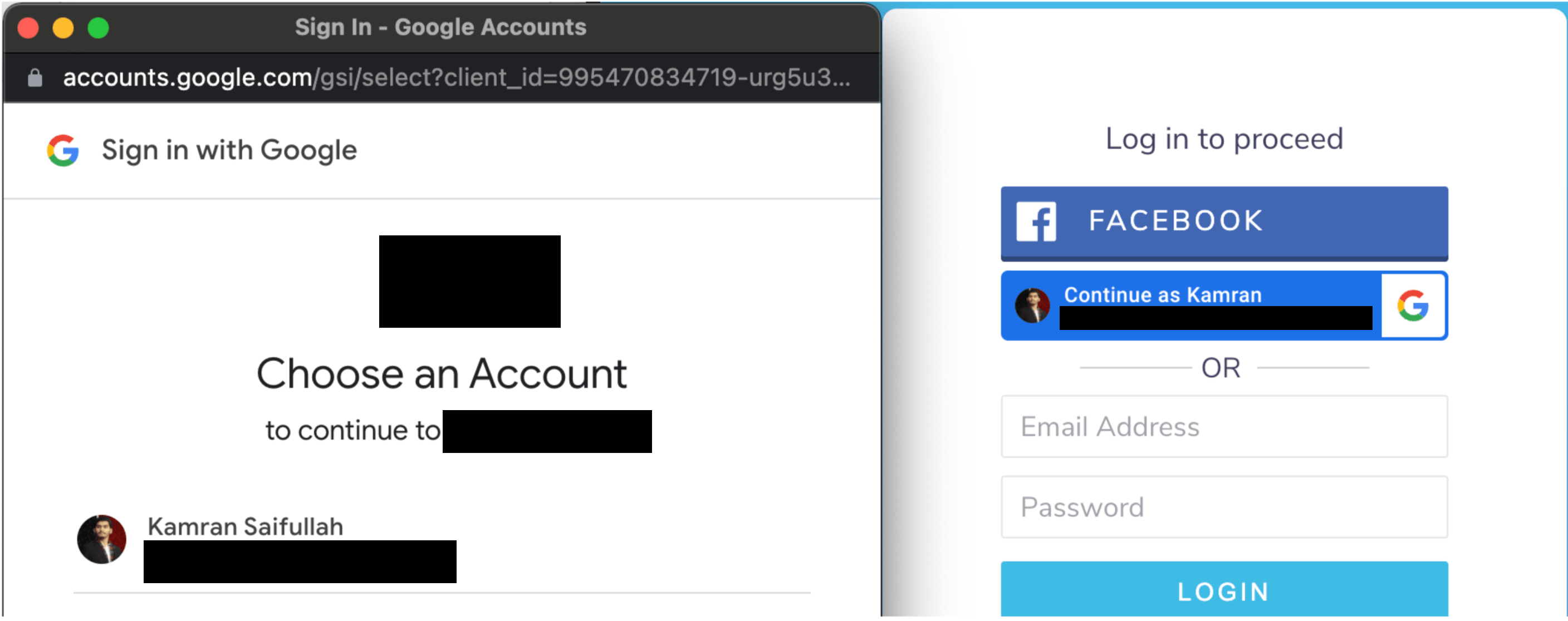
On the basis of the same, a new technique recently came into the limelight by a security researcher named Mr. D0x. In his research he has brought “Pop Up Pages” into attention. Companies like Google, Microsoft, Apple are using it as well as other companies which allow users to log into websites using their Gmail/Facebook accounts. On clicking the button, it opens up an additional browser page of which the URL can not be changed and clicks on our user account and/or allows it to be used by the company to log us into our accounts. Example is as below.
 Have we ever imagined whether the URL is actually the URL in the address bar? We haven’t and we have never checked it as well though have always agreed to give access. An example is as below, where the first page is actually a phishing page and the second one is the real page. Can you notice the difference? Not everyone can!
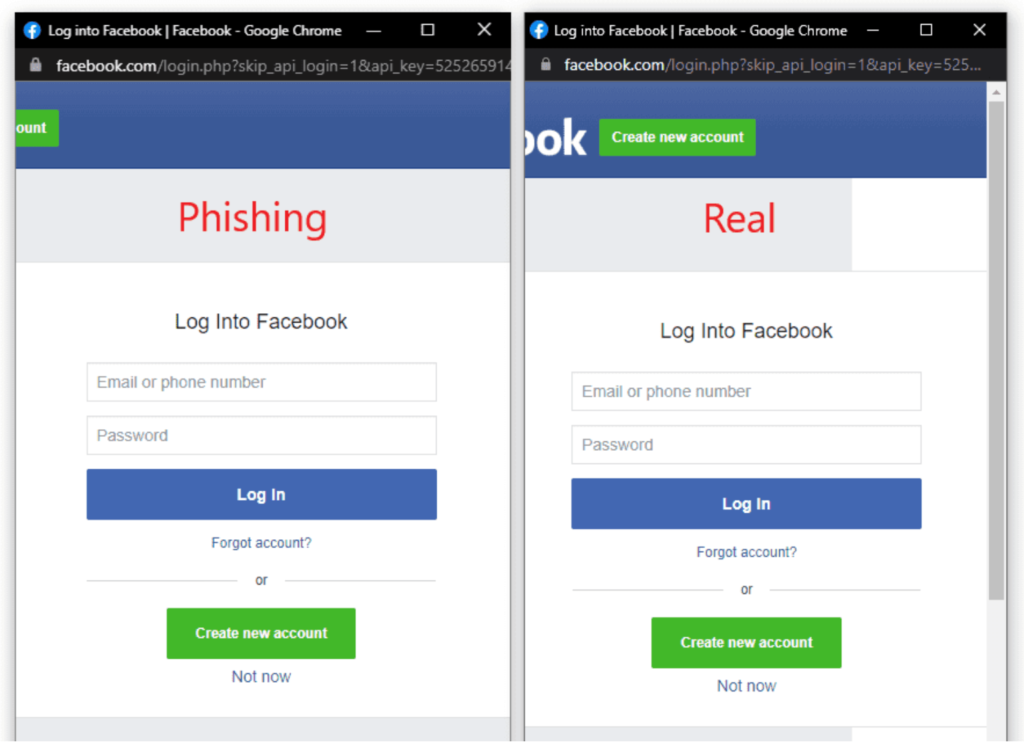
The same technique can be exploited by simply using HTML, CSS and some JavaScript.
Building BITB Attack Scenario
Suppose, you are an employee working at ECORP, a fictional company which owns the following domains.
- https://ecorp.com/ – Official Website
- https://webmail.ecorp.com/ – Custom Web Mail Website
Currently, there have been some changes on the management level and most of the applications (legacy) are now being updated using the newer technologies and secure mediums so you are already expecting some announcements from the IT Team and the management as well.
After some days you receive an email where it states that some changes have been made and management would like you to be the beta tester for the same.
Exploiting End Users Via BITB
You have received an email containing a link and you have clicked it because it looked like to be from a legitimate source i.e. IT Team. On opening the website, you are greeted with the following message.
Now, the IT Teams have made some changes i.e. they have removed the traditional login page and are now using the POP UP to have users log into their accounts.

On clicking the button. An additional browser opens the same as what we saw earlier. The page has two fields i.e.
- Username
- Password
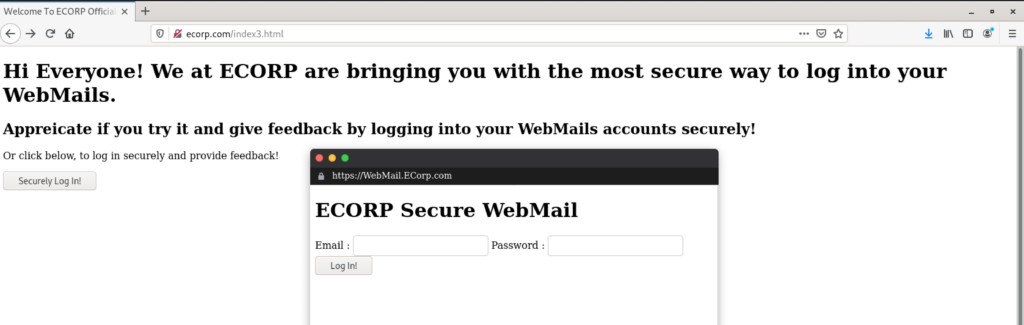
This seems too legit as the URL is (https://webmail.ecorp.com) so, you gave away your credentials and it greeted you with an error.
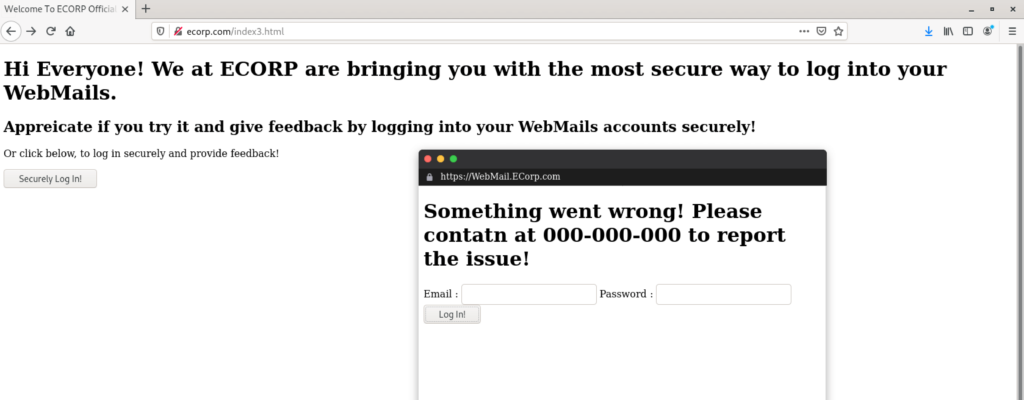
What Happened Wrong?
We need to understand that this was a phishing attempt using somewhat a new technique which is already known to the organizations though have not been used by the adversaries yet.
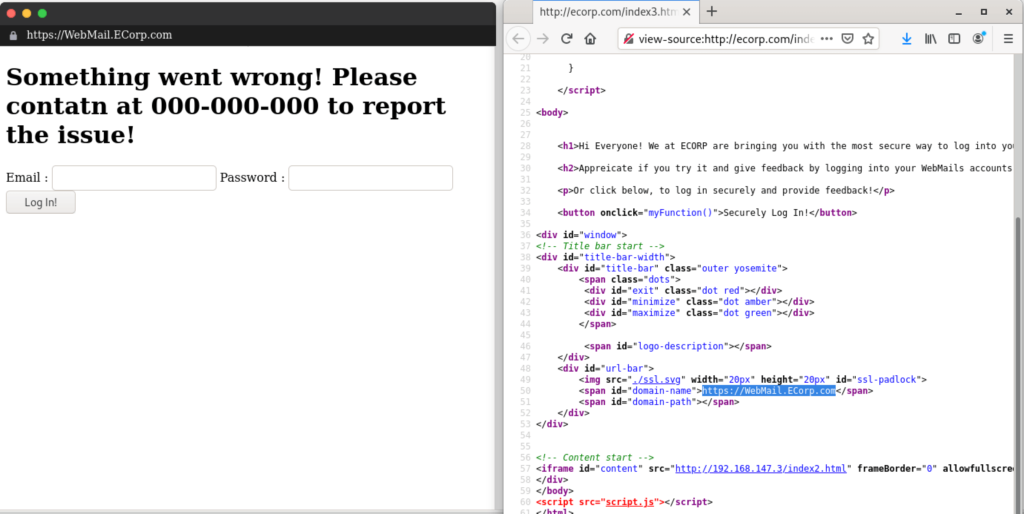
At first, the POP-UP was specifically designed based on your current browser and operating system. Secondly, it was designed using HTML, CSS and JAVASCRIPT to look exactly like an actual pop-up we come across on a daily basis on the internet. Thirdly, the address bar, buttons all were spoofed and specifically crafted based on the audience while the login page on which we entered our credentials was an attacker controlled site hosted using as IFRAME in the POP-UP page.
Conclusion
Browser In The Browser (BITB) is a new method in the arsenal of adversaries and now coming into limelight and may be used by the adversaries to potentially target any organization.
We recommend that awareness should be ensured to identify and tackle such types of attacks.
In the past, there has been a gap, the focus of training and awareness has NOT been on TTPs (Tactics Techniques and Procedures). Most of the content we see focuses on static content and not on the actual methods and exploits.
Hence, we recommend that there is a need to train employees with real life threats and actual scenarios encountered in real life attacks. This will help them understand how attacks work? and the process behind them. It will also make them understand the different possible ways adversaries can try to exploit them in order to get the information they seek. In the end, we the people need to fix our vulnerabilities and that of our people, otherwise we can be the next victims of a potential cyber breach.
References
- Mr. Dox – Research (https://mrd0x.com/browser-in-the-browser-phishing-attack/)
- Kamran Saifullah – BITB Browser Example Template (https://github.com/deFr0ggy/BITB-Browser-In-The-Browser-Attack)